▶️ Execution
Execution is where test cases and cycles are run (the screen's title reads "Manual execution"). AI@Test runs a case in one of two modes:
- Compilation, at the first run: the AI agent plays the Gherkin of the case in the real SAP system, step by step, and records what it did as a trace (execute-and-record). This run uses AI and has a cost.
- Replay, at every later run: the trace is replayed as is, without AI and with zero LLM tokens. A replay is free, and its verdict is stable.
The screen says it in one line: "First run of a case = the agent compiles while executing. Later runs = replay of the trace, without AI."
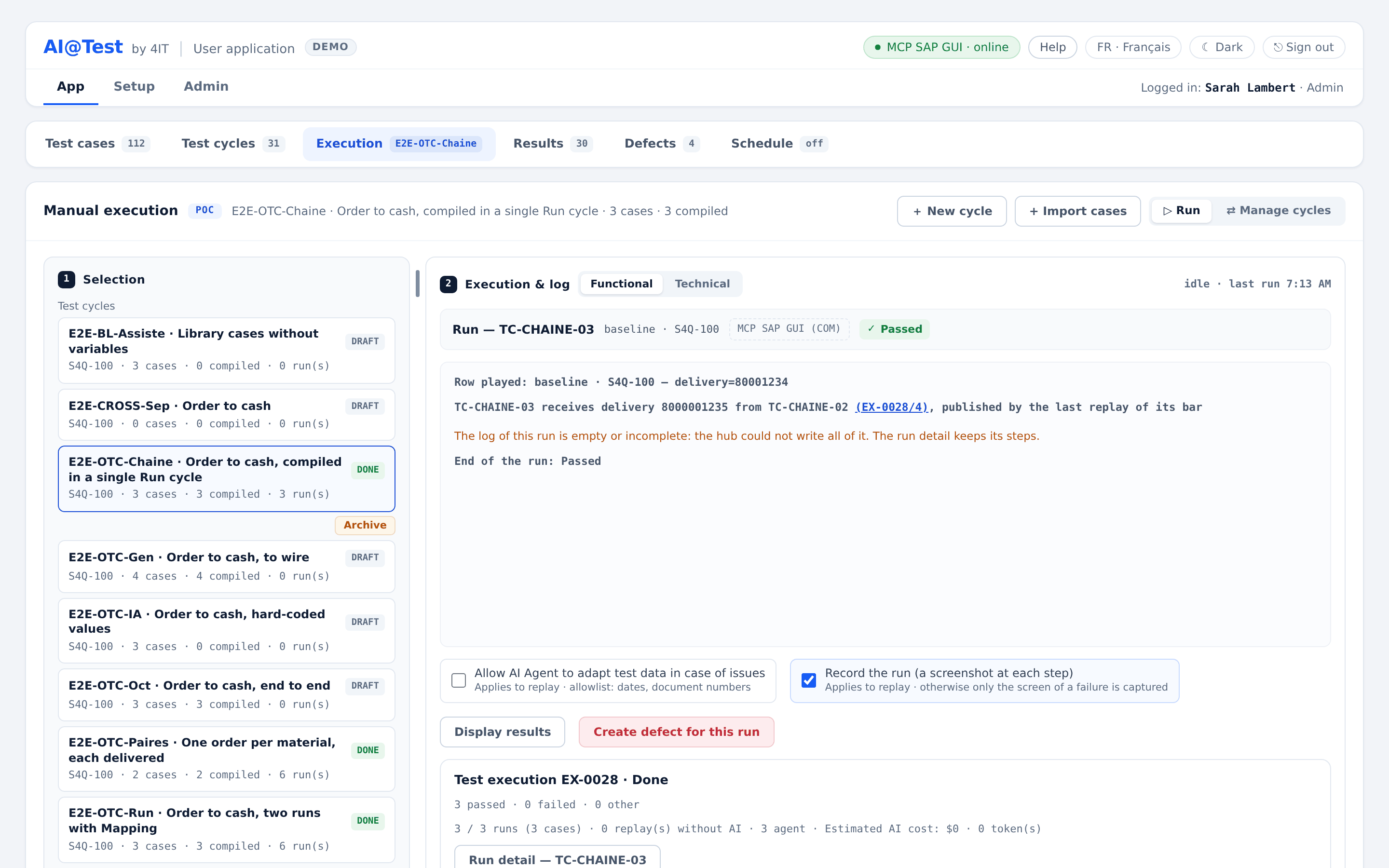
The Execution screen
The page has two zones, separated by a handle you can drag:
- Selection (zone 1): the cycles, then the cases of the chosen cycle and the run controls.
- Execution & log (zone 2): the run in progress (or the last one), its live SAP screen and its log.
Zone 1: Selection
- Cycle cards show the connection, the number of cases, how many are compiled or stale, and the number of runs, for example "connection · 12 cases · 10 compiled · 1 stale · 34 run(s)", with the cycle state ("Draft", "Running", "Done"). Archived cycles are folded under "Archived cycles (n)".
- Cases of the cycle ("Test cases · n"), in the order of the cycle, with their compilation state and last result. Search them with "Search a case…" and filter them: "All", "Failed", "Stale", "To compile", "Replay".
- Double-click a case to open the detail of its last run.
- "⇄ Manage cycles" opens Test cycles on the current cycle, to compose it.
The compilation state of each case:
| Badge | Meaning |
|---|---|
| To compile | The case has no trace yet: its next run is a compilation by the AI agent. |
| Compiled | The case has a valid trace: it is replayed without AI. |
| Stale · recompile | The Gherkin (or the connection) changed since the compilation: the trace no longer proves the case, and its next run recompiles it. |
Run a case or a cycle
- Choose a cycle, then, to run a single case, choose the case.
- Read what the run will do. Before the click, the screen announces the mode of the chosen case, "replay (0 tokens)" or "agent", with its reason, and the cycle note tells how many cases the AI agent will compile.
- Set the two options under the log if needed (see Run options).
- Click "▷ Run case" or "▷ Run cycle".
When "▷ Run case" or "Recompile" would have the AI agent compile the chosen case, AI@Test asks for confirmation first, for example "Run TC-…?": "The AI agent compiles the case while running it, in cycle …: this costs, and counts towards the instance's LLM spending cap. Later runs replay its trace, without AI." "▷ Run cycle" does not ask: its note already says how many cases the agent will compile.
The screen then says "Test execution EX-… started: its log shows in zone 2." If another run holds the lane, your request waits in the queue (see The lane and the queue).
| Control | What it plays |
|---|---|
| "▷ Run case" | The chosen case alone, in the chosen cycle, on its baseline (the base values of its "# Variables" block). On a downstream case of an active Mapping, its upstream cases are played first, then the case runs on the value they have just passed on. |
| "▷ Run cycle" | Every case of the cycle, in the order of the cycle, whatever the filter, one run per ticked data row. Each case plays in its own mode: one test execution can mix replays and compilations. |
| "Recompile" | Forces the compilation of the chosen case, even if it is compiled and up to date. |
"▷ Run cycle" sets aside the cases it cannot play and names each one with its reason, for example "archived case", "tagged @non-jouable", "open Blocking point in the Consistency check" or "the instance's LLM spending cap reached".
Compile or replay: the rule
The mode of each case is decided when its turn comes, not at the click.
| The case… | Its run |
|---|---|
| has no trace ("to compile") | is a compilation by the AI agent. |
| changed since its compilation ("stale: compilation forced") | is a compilation. |
| was compiled on another connection, or in another logon language | is a compilation on this connection ("compiled on another connection", "compiled in another language"). |
| is asked to recompile ("recompilation requested") | is a compilation. |
| has a valid trace | is a replay, without AI. |
Run options
Two checkboxes under the log apply to the next launches:
- "Allow AI Agent to adapt test data in case of issues" ("Applies to replay · allowlist: dates, document numbers"). Unticked by default. See Adapting a perishable value.
- "Record the run (a screenshot at each step)" ("Applies to replay · otherwise only the screen of a failure is captured"). Ticked by default.
Compilation at the first run
During a compilation, the AI agent reads the Gherkin of the case, drives SAP GUI on the cycle's connection, reads the SAP status bar after each action, and writes the trace. The log shows its work live, including its reasoning lines ("thinking"). A compilation takes longer than a replay, and its estimated AI cost is shown at the end of the run.
The agent plays the values of the case (for a case with variables, those of the data row being played), and it never changes a Then: a Then states what the test proves.
Run the Consistency check of a new case first: it reads SAP, writes nothing, and checks that the data and configuration the case assumes exist on the connection. A case never checked shows a banner ("… was never checked"). While an open Blocking finding of the check guards a case, its compilation is refused.
The bar: what a trace must pass
A trace enters the catalogue only after it passes the bar, the entry checks of the compilation (not to be confused with the SAP status bar):
| Check | What it requires |
|---|---|
| Form | The trace follows the schema of its connector and passes the lint; SAP messages are asserted by their message key, never by their text. |
| Transactions | Every transaction the Gherkin asks for is opened, then worked in, during the compilation session. |
| Proof of each Then | Each Then of the case is proved by an assertion of the trace: a message key, the value of a field, or a read of the database. |
| Database proof | A trace that creates data carries a database postcondition that shows the created record: "a success message does not prove persistence." |
| Two replays | Exactly two consecutive green replays of the trace, without AI. |
When a check fails, the agent gets the exact cause and corrects its trace, in up to three correction rounds. Only a trace that passes the whole bar is kept: the case becomes "Compiled".
For a case with variables, the compilation runs on one data row and the bar replays two distinct rows. When the trace writes to SAP, the bar replays two rows other than the compilation row, because the compilation may have consumed its data. Rows that the bar replayed from a writing trace are then set aside from that test execution ("row consumed by the compilation's bar"). A passed compilation whose own row was not replayed by the bar carries the mark "row not replayed by the bar": its green rests on the compilation by the agent alone.
When a compilation does not succeed
- SAP contradicts a Then (an SAP message, identified by its key, shows that the expected result cannot be reached): the run is Failed and a defect is created with the exact SAP finding. The agent never records a trace that encodes the failure as the expected result.
- Any other cause (the bar not passed, an agent limit, an SAP session unavailable…): the run is Blocked, without a defect. The run detail names the cause and "What to do": "correct the case, then re-run it", "re-run the case" (a new compilation, with its AI cost), or contact support with the reference shown.
A failed compilation never writes a trace, and never removes the previous trace of the case.
Each instance caps what its compilations and consistency checks spend in LLM, per day and per month. Once a cap is reached, every compilation and every consistency check is refused before it starts, and replays go on. Admins follow the spending on the Instance LLM spending card.
Deterministic replay without AI
A replay plays the trace of a compiled case on the cycle's connection, step by step, with no AI call: "replay (0 tokens)". For a case with variables, the values of the played data row are injected into the trace. The checks recorded at compilation (message keys, field values, database proof) are played again, and screenshots are taken as the run options say.
| Outcome | Status | Defect |
|---|---|---|
| Every step passed | Passed | No |
| A check is contradicted by SAP (a message key, a field value, a database proof) | Failed | Yes, with the SAP message at the failing step |
| A perishable value (a date, a document number) failed, adaptation not allowed | Failed: a data failure; the log invites you to allow the adaptation | No |
| The replay failed without any SAP finding (for example, an action of the driver failed) | Blocked, cause unclassified, to analyze | No |
| The replay could not run (a precondition not met, a dependency failed) | Blocked | No |
| The infrastructure failed | Failed · INFRA (see Freezes) | No |
A replay never triggers a compilation or a repair of its trace on its own: a red replay stays a result for a person to read.
A result is non-probative when it proves nothing about the case as it is: its Gherkin changed since, the run did not play the trace the compilation validated, or that trace has since been found faulty. It is shown greyed out, never in green.
Adapting a perishable value
Some values do not survive from one day to the next: an open posting period, a delivery date, the number of a document created by an earlier step. With "Allow AI Agent to adapt test data in case of issues" ticked, the replay adapts them:
- Only the fields of a closed allowlist are adapted: dates and document numbers. A document number is rebound to a number the same run captured earlier, never invented; a date is rebound to the date its kind requires (for example, a posting date to the period actually open).
- The adaptation is applied before the replay, to a copy of the trace: the trace of the catalogue is never changed.
- It never touches a Then or any expected result.
- Each adaptation is logged before → after, with its rule. The step reads "Recovered", the run stays "Passed", and the run detail lists the change under "Data modified".
The replay stays without AI: the adaptation follows fixed rules. It needs the permission to adapt (Admins and Testers). Scheduled runs, "Re-run the failed cases" and the retest of a defect never adapt data.
Recompile when the screen changes
A trace replays the SAP screens as they were at its compilation. When a screen changes (an upgrade, new configuration, a moved or new field), the replay of the old trace fails at the step that no longer matches. The run detail shows that step, with what was "Expected" and what was read ("Actual").
AI@Test never repairs a trace on its own. Once you have checked that the change is expected, and is not a regression to report, recompile the case:
- "Recompile" in zone 1 (the chosen case), "Recompile case" in the run detail, or "Recompile" on a case in the designer.
- The confirmation says: "The AI agent recompiles the case in cycle … of this run: this costs. When recorded, a compilation that succeeds keeps a screenshot of each step, taken at one of the two replays without AI that validate it."
- The new trace replaces the old one only once it has passed the bar. A failed recompilation keeps the old trace.
When the Gherkin of a case changes, the case becomes stale, and a banner says so: "… is stale — the Gherkin changed since the compilation. The trace no longer matches the case: its last results are not probative anymore. Recompile before concluding." Its next run, whichever it is, recompiles it.
The lane and the queue
Only one run at a time drives an SAP session: this right is the lane. There is one lane per driver, so runs on different drivers can run at the same time. A consistency check also takes the lane while it reads SAP.
A launch that finds the lane busy is never refused: it waits in the queue, and starts automatically when its turn comes, without any action from you.
- The banner says: "Lane … busy — your request waits (position n)", with who is running what: "One run at a time on this lane: yours starts automatically."
- "Queue (n)" lists the waiting requests, with their position, what launched them ("Run cycle", "Run case", "Re-run", "Recompile", "Retest", "Schedule"…) and who queued them, at what time.
- Launching the same cycle (or case) again while your request waits updates it instead of adding another: "Your request already queued is updated (position n)."
- "Leave the queue" withdraws your own request. An Admin can "Remove from the queue" any request.
- "Other lanes" shows what each other lane is doing.
If the execution agent of the cycle's connection stops answering, a banner warns "Agent … offline — execution impossible": no run starts before it is back. "Diagnose" leads to the Platform card in Admin › Connections.
Follow the run live
Zone 2 follows the run in progress:
- The run bar: "● execution in progress" (or "idle · last run hh:mm"), the mode ("replay", or "agent · compiling"), the driver of the cycle's connection, "Test execution EX-… · cycle … · started by … at …", the progress ("3 / 12 cases done"), the estimated AI cost, and "■ Stop".
- Current step: the step being played.
- SAP screen: the live SAP screen of the run ("Live · at most n s ago"), with "Pause" and "Resume". The live view is never stored and is not evidence; the evidence is the screenshots of the run.
- The log ("Run log"), streamed live, in two views: "Functional" for the steps and verdicts, "Technical" for every line. Each line has its time and level (information, success, warning, error, screenshot, thinking). For a case with variables, "Row played: …" says which row and values are played.
At the end, zone 2 shows "Test execution EX-… · status", the result ("8 passed · 1 failed · 1 other") and the summary, for example "10 / 10 cases · 9 replay(s) without AI · 1 agent · Estimated AI cost: …". Cases set aside are listed under "Excluded". Outside a run, zone 2 shows the log of the last run.
From zone 2, "Display results" opens Results, and "Create defect for this run" opens a defect by hand. Double-click a case in zone 1 for its run detail: each step with its Gherkin line, what was "Expected" and what was read ("Actual"), the SAP status bar and its screenshot (see Results).
Stop a run
"■ Stop" asks "Stop the run?": "The current case becomes blocked and the next cases are not executed; no trace is written, no defect is created. The lane is freed." Click "Stop the run" to confirm, or "Keep running".
A stop is not a verdict: the stopped cases are Blocked, never Failed, and the test execution is "Stopped". Only the person who launched the run and an Admin can stop it. A run that exceeds the lane time limit of the instance is stopped the same way.
Freezes and how to re-run
A freeze stops a cycle when continuing would be pointless or unsafe. A freeze is never a defect: nothing is charged to the cases.
Frozen on an infrastructure failure (INFRA)
When the infrastructure fails during a run (the agent or the network unreachable, a session that does not honor the connection, a driver of another version than the one AI@Test requires…):
- the failing run is "Failed · INFRA", and every next case of the cycle is blocked, "not run", without a defect;
- the test execution is "Frozen (INFRA)", and the banner reads "Cycle … frozen on INFRA verdict" with the cause: "A case failed for an infrastructure reason, not a functional regression: the rest of the cycle is frozen and no defect was created."
Once the service is back, click "Re-run the cycle", which plays the whole cycle again (held cases excepted). A healthy run clears the freeze. If the failure lasts, tell support.
Frozen on a SAP session to inspect
When a run stops where SAP may have been written to, or where a popup may still be open, AI@Test freezes instead of guessing: "Cycle … frozen — SAP session to inspect. Writes may have been made in SAP, a window may still be open. No defect was created."
- The case is held: "This case is held: its last execution froze on a SAP session to inspect."
- No automation re-runs a held case: "▷ Run cycle", scheduled runs and "Re-run the failed cases" exclude it, naming it.
- Check the SAP session (and what the case may have written), then choose the held case and click "Re-run the held case". It runs again on its own, on its current connection.
Freeze causes
| Cause | What to check |
|---|---|
| infrastructure unreachable | The execution agent, the network, the SAP system. |
| SAP session to inspect | The SAP session: writes may have been made, a window may be open. |
| refused by the connection | The session does not honor the connection (client or language). |
| driver not pinned | The driver version served by the agent differs from the required one. |
| refused by the execution agent | The agent refused the run. |
Re-run options
| Action | Where | What it does |
|---|---|---|
| "Re-run the failed cases" | Zone 2 at the end of a test execution, and zone 1 next to the last test execution | One new test execution replays, without recompiling, the failed and blocked cases of that test execution. |
| "Re-run case" | Run detail | The case runs again on its own, in the cycle of that run, on the row of that run. |
| "Recompile case" | Run detail | The AI agent recompiles the case in the cycle of that run. |
| "Re-run the cycle" | INFRA freeze banner | The whole cycle runs again, held cases excepted. |
| "Re-run the held case" | Run detail, or zone 1 with the held case chosen | The held case runs again on its own. |
| "Retest" | Defects | Reruns the original case of a defect. |
The re-runs of a run detail ask for confirmation, with their own "Record the run" checkbox, and take the adaptation option of zone 2.
Statuses
| Object | Statuses |
|---|---|
| Run | Running, Passed, Failed, Blocked |
| Step | Passed, Recovered, Failed, Blocked |
| Test execution | Running, Done, Stopped, Frozen (INFRA) |
"Recovered" is never the status of a run: a run with recovered steps stays "Passed". A passed run in which a Then is not anchored reads "Passed · x/y Then anchored": it is counted apart, never among the passed ones (see Results).