🔍 Consistency check
The Consistency check is an AI agent that reads SAP read-only to check a case against the SAP system before it is compiled. It reads the master data and configuration the case assumes on the cycle's connection, and it rereads the logic of the Gherkin. "It creates or changes nothing in SAP: it proposes changes to the case, which you accept or not."
Running it first catches problems such as a customer outside the sales area, a material without a sales view or a closed period before the compilation spends AI cost on them. The check is advised but not mandatory: a case that was never checked still compiles.
Scope
- SAP GUI connections only: "The check reads SAP GUI only".
- Order-to-cash cases: "The check covers O2C only (
@module:SD)". The module comes from the case's@module:tag, or is inferred from the first transaction the case cites when the tag is missing. - Never on Production: as with runs, the check refuses a connection classified as Production.
Outside this scope, "Run the check" is greyed out with its reason, and a result already concluded outside it reads "Check not applicable". The check never says "no deviation" without having read SAP.
What it checks
The check runs five controls:
| Control | What is read |
|---|---|
| Customers | Sales area, blocks |
| Materials | Views, sales view, stock per plant |
| Configuration | Order type, item category |
| Open MM periods | The open period and the previous period |
| Gherkin logic | The logic of the case's steps |
Each control shows its progress: "to read", "read", "to reread", "reread" or "not read". When the channel cannot verify an aspect, the control says so, for example "not verifiable through SAP GUI: blocks". The result never claims to have checked something its channel could not read. This notice does not block anything: "Run the check" stays available.
Where to open it
| From | How | What you can do |
|---|---|---|
| Execution | Choose the cycle, select a case, click "Consistency check" | Run the check on the cycle's connection, decide, apply |
| Execution banners | "Open the check" on "TC-… was never checked" or "TC-…: N open blocking finding(s) in the consistency check" | Same as above |
| Test cases library | The check chip of a case, per connection ("check", "N findings", or a state) | Read only: "The check runs from a cycle, in Execution; here, it is read." |
| Details panel of a case | "Consistency check" | Opens the check, read-only when the panel was opened from the library. It is greyed out while you have unsaved edits: "Save or discard your input: the check reads the saved text, never an input in progress." |
Run the check
- In Execution, choose the cycle, select the case and click "Consistency check". The modal opens.
- Read the introduction, "Check the data and the process before the compilation", and the list of controls.
- Click "Run the check". After a first result, the button becomes "Run the check again".
- Follow the progress: the state reads "running" and the note says "check running · read-only".
The check reads SAP read-only through ADT when the hub offers it; otherwise it reads through the SAP GUI lane. Through the lane, the check waits in the queue like a run ("Queued, position N", with what holds the lane), then "The check holds the SAP GUI lane". A running check can be stopped with "Stop" by the user who started it or by an Admin; it stops, then frees the lane.
The modal subtitle shows the connection read, the channel ("ADT channel" or "through the SAP GUI lane"), "read-only", "checked on …" and the "estimated AI cost". Each check has its own spending cap, and, like compilations, checks count toward the instance's LLM spending caps: once a daily or monthly cap is reached, no Consistency check starts until the cap resets. Replays are never refused for spending.
States of a check
| State | Meaning |
|---|---|
| never checked | No check has run for this case on this connection. |
| queued | Waiting for the SAP GUI lane. |
| running | The agent is reading SAP. |
| no finding | "No deviation: the data read and the Gherkin logic are consistent." |
| open findings | Findings are waiting for a decision. |
| blocking | At least one open Blocking finding: the compilation is refused. |
| rows not judged | Some data rows could not be fully read. They are never treated as compliant. |
| stale | The Gherkin, the connection or the data rows changed since the result. |
| not applicable | The case or the connection is outside the check's scope. |
Read the modal
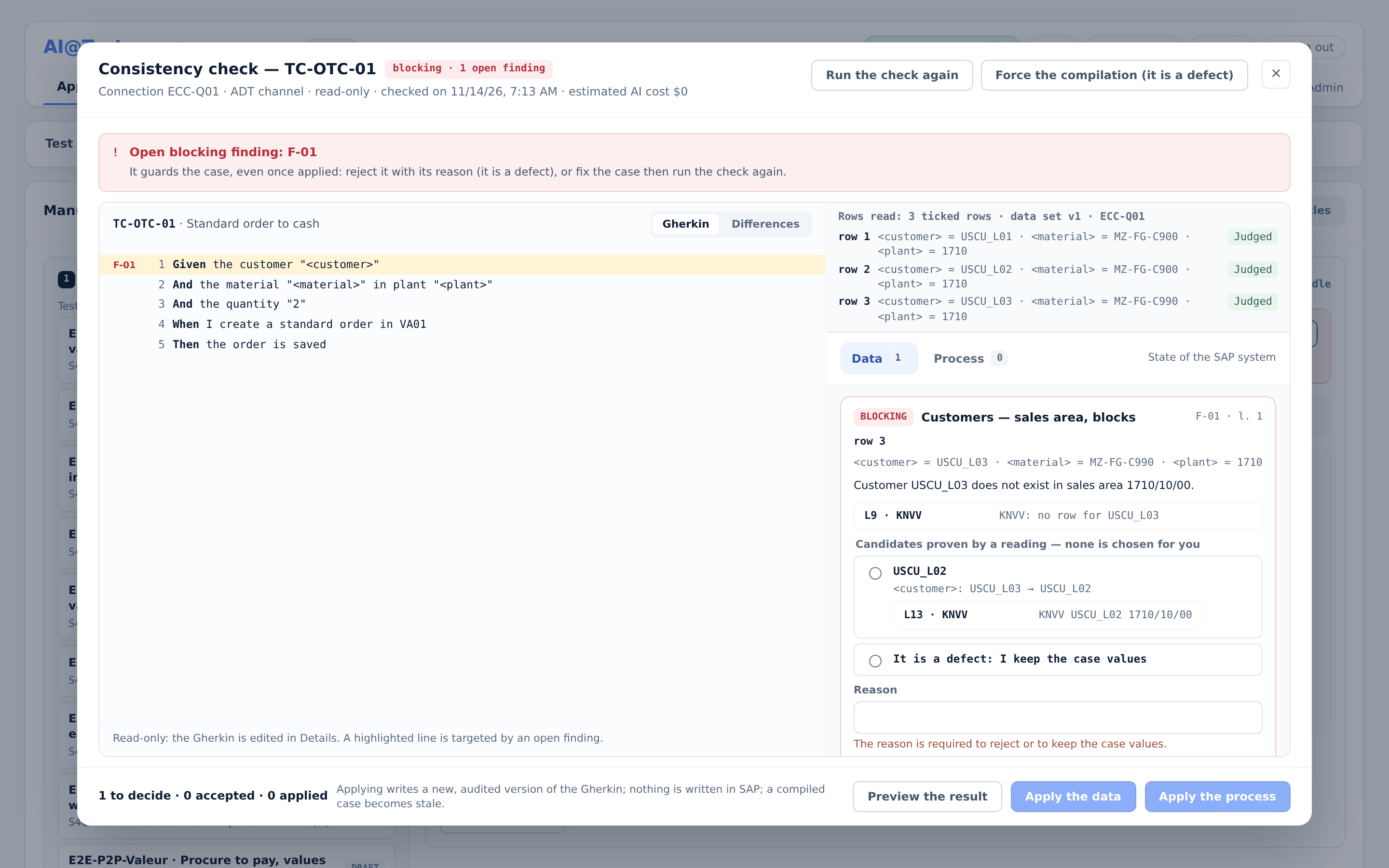
- Header: "Consistency check — TC-…", the state chip, and the buttons "Run the check" or "Run the check again", "Stop", and "Force the compilation (it is a defect)" when a Blocking finding guards the case.
- Left side: the case's Gherkin, read-only ("Read-only: the Gherkin is edited in Details."). Each line targeted by an open finding is highlighted and labeled with that finding's identifier. Switch between the "Gherkin" and "Differences" views.
- Right side: two tabs with counters. "Data" covers the state of the SAP system; "Process" covers the Gherkin logic. Each finding is a card.
Finding cards
Each card shows:
- its severity, its control and its identifier, with the Gherkin lines it targets ("l. …");
- for a case with variables, the data row it concerns and its values, or "all rows";
- the finding itself and the evidence read in SAP;
- "depends on …" when it builds on another finding;
- its proposal: differences (a line removed, a line added), candidates, or options;
- a "Reason" field and its status, such as "accepted by … on …".
| Severity | Meaning |
|---|---|
| Blocking | The only severity that blocks the compilation. |
| Risk | A likely problem, which does not block. |
| Decision | A choice left to you. A pending decision does not block. |
| Info | Information. It proposes nothing. |
| Compliant | Checked, no deviation. No action needed. |
Data rows of a case with variables
For a case with variables, the check reads the baseline and each row ticked in the cycle: "Rows read: baseline and N ticked rows · data set vN · …". Each row reads "Judged", "Not judged" or "to judge". A row not judged is never treated as compliant: "Run the check again to read it."
Decide
On each card:
- Accept the proposal. When the card offers candidates, choose one first: "Candidates proven by a reading — none is chosen for you."
- Reject the finding. A reason is required, and a rejected Blocking finding no longer blocks.
- "It is a defect: I keep the case values": offered among the candidates. Choose it, give the required reason, then accept: the finding is closed like a rejection, and nothing is written.
- Undo a decision, as long as the finding has not been applied.
A finding moves through "to decide", "accepted", "rejected", "case values kept", "applied" or "no action". The footer sums up the result, such as "2 to decide · 1 accepted · 0 applied". Each decision is saved with its author and date.
The check never rewrites a Then and never writes technical tokens into the Gherkin. When a finding concerns a Then, edit the case yourself in Details, or reject the finding with its reason.
Apply
Accepted findings are applied by family:
- Click "Preview the result", or directly "Apply the data" or "Apply the process". The left side switches to "Differences" and shows the Gherkin as it would be.
- For a finding on a variable, the preview shows "Apply to the data set (new version)", such as "data set v1 → v2", and lists each row and value that changes.
- Click "Apply the data" or "Apply the process" again to confirm. The modal shows "New Gherkin version saved (…)".
"Applying writes a new, audited version of the Gherkin; nothing is written in SAP; a compiled case becomes stale." A stale case is recompiled on its next run. A finding applied to a data row of a variable is the exception: it creates a new version of the data set, the Gherkin keeps its variables, and a compiled case stays compiled.
If the case changed after you opened the modal, applying is refused: "The case changed since you opened it. Your decision is kept: compare with the current version, then apply again." Click "Compare".
Banners
| Banner | What to do |
|---|---|
| "Open blocking finding: …" | "It guards the case, even once applied: reject it with its reason (it is a defect), or fix the case then run the check again." |
| "Result of … read on a previous version" | "The Gherkin or the Connection changed since this reading of SAP: run the check again so it rereads the current version." |
| "Stale: new data set version", "Stale: row selection changed", "Stale: data rows changed" | "The data rows the cycle would play have changed since this SAP read: run the check again so it reads them." |
| "Check not applicable" | The reason is given: the connection or the case is outside the scope. |
| "Last check interrupted" | The cause is given. Run the check again. |
| "Read-only" | "The check runs from a cycle, in Execution; here, it is read." |
Blocking findings and forcing the compilation
An open Blocking finding refuses the compilation of the case on every launch that would compile it: "Run case", "Run cycle", "Re-run case", "Recompile case", "Retest". A replay of an already compiled case is not affected. "Run cycle" does not stop the whole cycle: it excludes the guarded case with the reason "open Blocking point in the Consistency check". For a case with variables, a Blocking finding tied to one row's values guards only that row: "open Blocking point in the Consistency check on this row".
A Blocking finding does not go stale on its own. It keeps guarding the case until it is rejected with a reason, or until a check run on the current version no longer finds it.
When you are sure the case values are right and SAP is wrong, click "Force the compilation (it is a defect)". The confirmation, "Force the compilation?", reads:
"The case values prevail: the compilation will start despite the blocking findings, and the defect it produces will be yours. The action is audited."
Confirm with "Force". If the compilation then hits an SAP finding, a defect is created as usual (see Defects).
Who can do what
| Action | Admin | Tester | Auditor |
|---|---|---|---|
| Read the check, its findings and evidence | Yes | Yes | Yes |
| Run, stop, force the compilation | Yes | Yes | No |
| Accept, reject, undo, apply findings | Yes | Yes | No |
A Tester stops only a check they started; an Admin can stop any check.