🐞 Defects
A defect is a deviation reported by SAP during a run. It stays open until a person closes it, usually after retesting its original case. A defect is created automatically when a run fails on an SAP finding; an Admin or a Tester can also create one by hand. Each defect stays tied to the run it came from, so you can go back to the evidence: the exact SAP finding, the step, the values and the screenshots.
How a defect is created
Automatically, from a failed run
A defect is created only from a positive SAP finding: proof that SAP answered and contradicted the case. That means one of these:
- During a replay: a check of the trace is contradicted, either an expected value on screen or a database proof, or an undeclared SAP error popup carrying a message key appears. A popup without a key, or with a warning or information key, freezes the cycle on an SAP session to inspect instead.
- During a compilation: the AI agent reports an SAP finding, and the driver actually returned that SAP error message, with its key, during the session. A statement by the agent with no observed SAP finding blocks the case without a defect ("no SAP finding observed").
The defect is keyed by its case and the SAP message key (message class and number). When SAP showed no error message, the key is the check that was contradicted.
"One open defect per pair (case, SAP key): a new finding on that pair increments it; once the defect is closed, a finding creates a new one." The same failure seen again, in another run, cycle or connection, does not pile up duplicates: it raises the findings count and updates the date of the last finding.
An automatic defect is created with these values:
- state Open, nature Configuration, severity High (you can change both later);
- the SAP finding as its summary, and the key;
- the case, the run and the failed step it came from;
- the Expected and Actual values of the failed step;
- the creation date, with the agent as author, and a findings count of 1.
What never creates a defect
- An infrastructure failure (INFRA verdict, frozen cycle): the infrastructure failed, not SAP. Re-run once the service is back.
- A blocked case: no SAP finding, so no defect. The cause is shown in the run detail.
- A case held on an SAP session to inspect: the cycle freezes and the case is held, without a defect. You decide what follows.
- A data failure: SAP answered with a message known to come from the test data itself, not from the configuration. Turning on "Allow AI Agent to adapt test data in case of issues" lets a replay adapt dates and document numbers under the allow list.
- A stop, the lane time limit or a hub restart.
- A compilation that ends without an SAP finding, such as an agent limit reached or an entry bar not passed: the case is blocked, with "What to do".
By hand
You can open a defect on any finished run, including a passed one, for a gap the Thens did not catch:
- Open the detail of the run (from Results, or with a double click in Execution).
- Click "Create a defect" for the whole run, or "Create a defect on step N" on a step tile. In the Execution log, the same form opens from "Create defect for this run".
- Fill in the form (its fields are in the table below).
- Click "Create the defect". The new defect is attached to the run, and to the chosen step if you picked one.
| Field | What to enter |
|---|---|
| Step | The step that carries the defect, or "No step: the whole run". A step that already carries a defect is marked "already carries DEF-…". |
| Severity | Low, Medium or High. Leave "The hub default" for Medium. |
| Summary | "What the gap says, in one line". |
| Description | Free text. |
A defect created by hand has no SAP finding: its detail reads "None: defect created by hand." A double click never creates two defects.
You cannot create a defect on a run that is still going, or on a run of an archived cycle. A run that failed on an infrastructure outage gets no defect either: "Failed on an infrastructure outage, not an SAP discrepancy: re-run the case once the service is back."
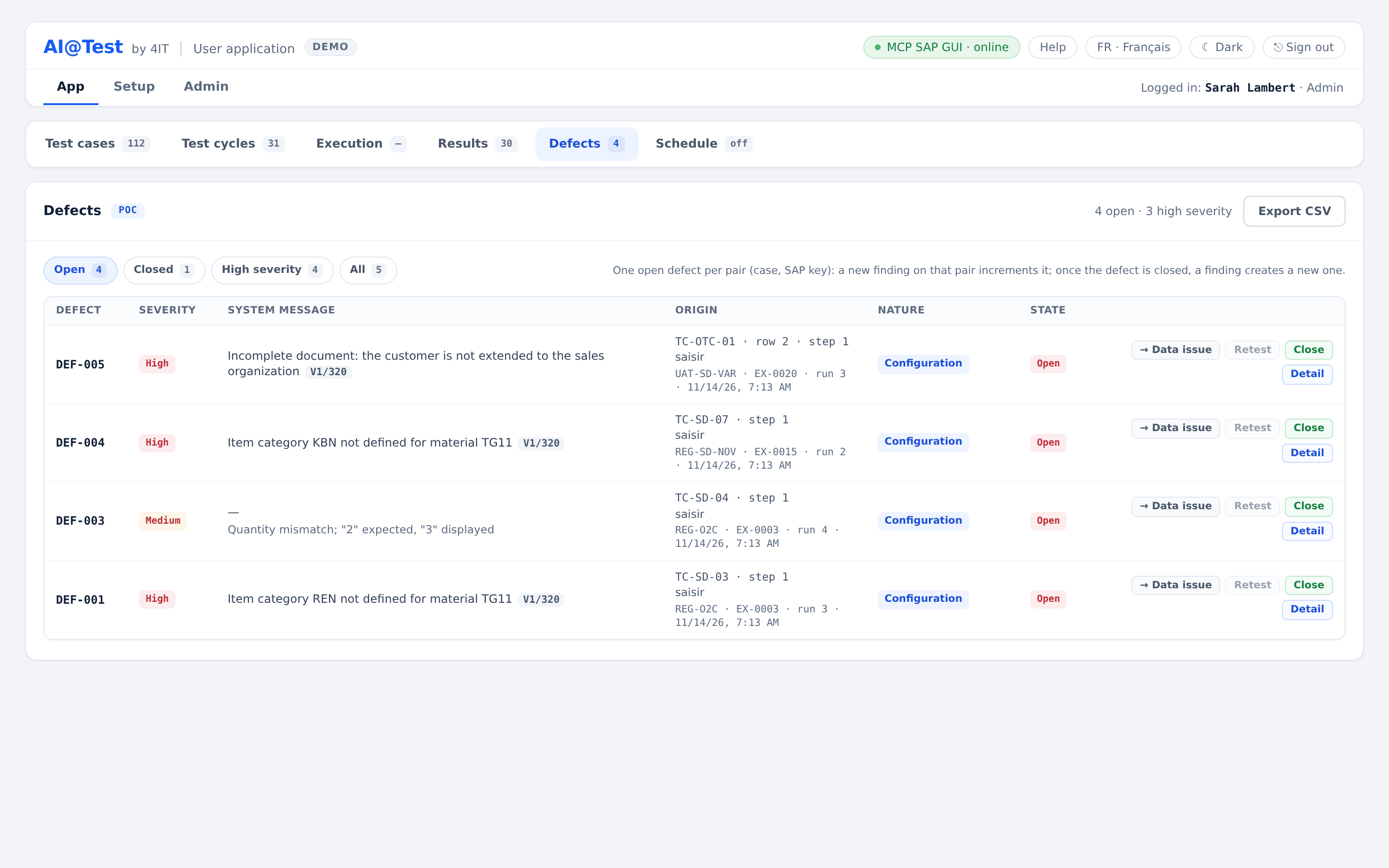
The Defects list
Defects is a sub-tab of App. It lists the defects of every cycle, archived cycles included. A defect is never deleted.
- Summary, top right: "N open · M high severity". M counts open defects only.
- Filters, each with its counter: "Open" (the default), "Closed", "High severity" (any state), "All".
- Help line: the rule of one open defect per case and SAP key.
- "Export CSV": "The file follows the displayed filter."
| Column | What it shows |
|---|---|
| Defect | Its identifier, DEF-…. |
| Severity | Low, Medium or High. |
| System message | The SAP finding and its key, with the summary below when it differs. |
| Origin | The case and step (such as "TC-… · step 3"), the step label, then "cycle · EX-… · run N" and the creation date. For a case with variables, also the row the run played. If the origin run no longer exists, it reads "origin run gone". |
| Nature | Configuration or Data issue. |
| State | Open or Closed. |
| Actions | "→ Data issue" or "→ Configuration", "Retest", "Close" or "Reopen", "Detail". |
Click a row to open the detail of the defect.
The detail of a defect
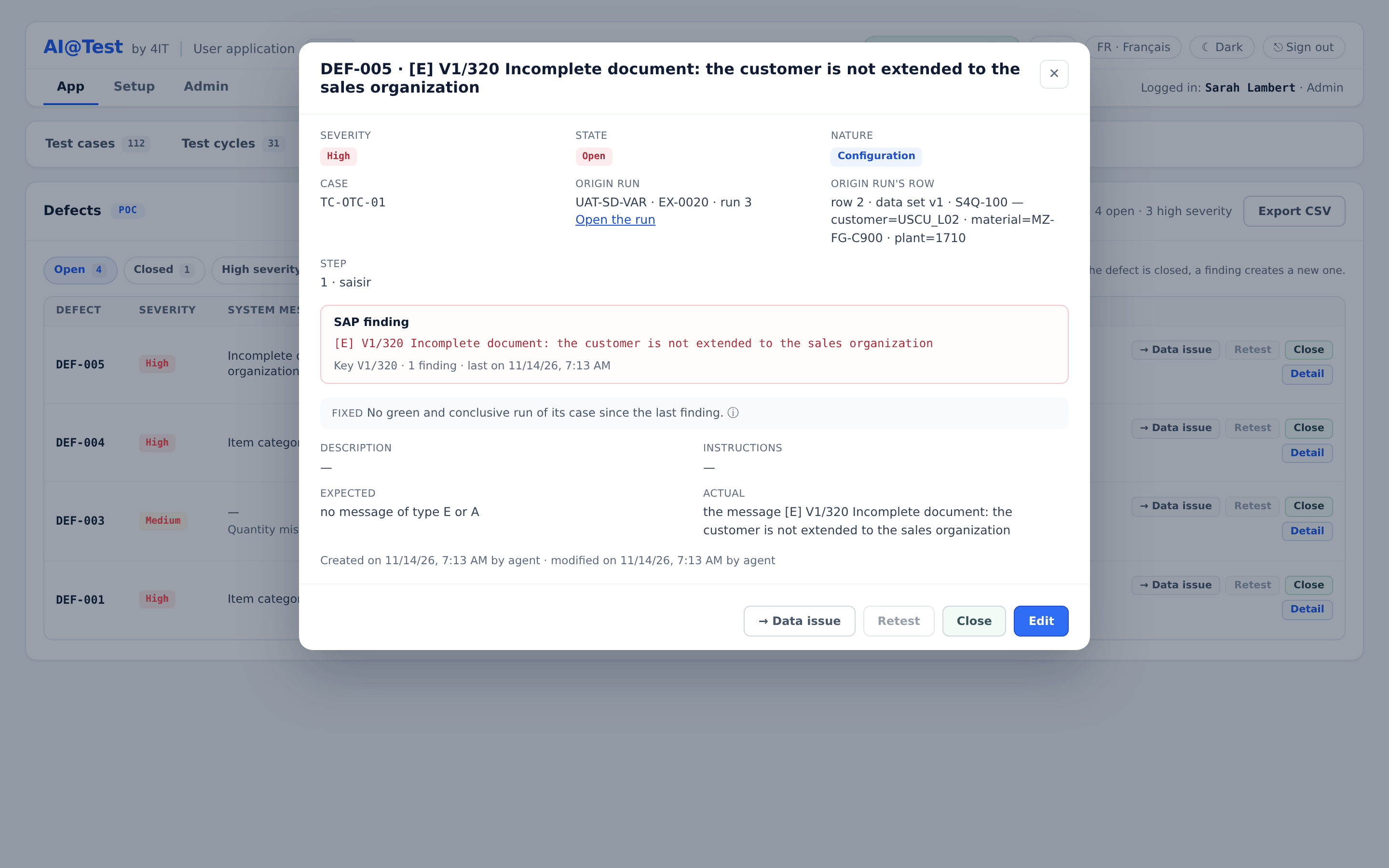
The detail, titled "DEF-… · summary", shows:
- Severity, State, Nature and Case.
- Origin run: "cycle · EX-… · run N", with "Open the run".
- Origin run's row: for a case with variables, the played row and its values.
- Step: the step that carries the defect, or "the whole run".
- SAP finding: the exact SAP message, never reworded, then "Key …", the number of findings and "last on …".
- Fixed: "on …" once a passed, probative and fully proven run of the case has followed the last finding, on the connection where the defect was last seen. Otherwise "No green and conclusive run of its case since the last finding." "A green run never closes a defect: only a human closes it."
- Description, Instructions, Expected, Actual.
- "Created on … by … · modified on … by …".
The footer holds the actions: "→ Data issue" or "→ Configuration", "Retest", "Close" or "Reopen", and "Edit".
The evidence behind a defect
A defect shows its evidence in four ways:
- The SAP finding and its key are copied exactly from what SAP returned. They can never be edited.
- Expected and Actual of an automatic defect come from the failed step: what the check expected and what the engine read.
- "Open the run" opens the origin run, read-only. From there you see each step, the SAP status bar and the screenshots. It works for every role, and for an archived cycle too.
- The findings count and the date of the last finding show how often the same deviation came back.
Lifecycle
A defect has two states: Open and Closed. Nothing closes a defect on its own.
| Action | What it does |
|---|---|
| Retest | "Reruns the defect's case in the cycle where the failure was last seen, without adapting data. The defect does not change." It asks for confirmation and offers "Record the run (a screenshot at each step)", ticked by default. |
| Close | Closes the defect: "detection is re-armed". The next finding on the same case and key creates a new defect; a closed defect is never reopened automatically. No reason is required. |
| Reopen | Reopens a defect closed by mistake. It is refused while another defect is already open for the same case and key. |
| → Data issue / → Configuration | Requalifies the nature. "The nature changes the triage, never the verdict of the case." The engine always creates Configuration; Data issue is always a human decision. |
The usual loop is:
- A run fails on an SAP finding and a defect opens.
- The SAP configuration or data is fixed outside AI@Test.
- Click "Retest" and check that the case passes. The detail then reads "Fixed: on …".
- Click "Close".
Retest is refused, with its reason shown, when the cycle's connection is no longer the one of the defect's run, when the origin run is gone, when the case has left the cycle, or when the cycle is archived.
For a case with variables, "Fixed" appears only when every data row a run flagged for this defect has a later passed run, on the same values and the same connection. When the only passed run is a compilation whose row the bar did not replay, the detail says: "Not yet: a green run of its case is a compilation whose row the bar did not replay, and it does not fix it. “Retest” replays that row."
Edit a defect
Click "Edit" in the detail of a defect.
| Editable | Never editable |
|---|---|
| Summary, Severity, Nature, Description, Instructions, Expected, Actual | The SAP finding, its key, the case, the run and the origin step |
Each text field holds up to 2,000 characters. Click "Save"; if nothing changed, the form says "Nothing has changed." If someone else changed the defect in the meantime, the save is refused, and "Reread the defect, keeping my input" reloads the defect without losing what you typed. Every creation, edit, closure, reopening, requalification, retest and export is recorded in the audit trail.
Export CSV
"Export CSV" downloads the defects of the displayed filter. Column headers are field names, the same in every language:
| Column | Content |
|---|---|
id, severity, state, nature | The defect and its qualification. |
cycle, cycle_archived, case | Where it was found. |
passage, run, step | The test execution, run and step it was born from. |
data_set, row, row_values | For a case with variables, the played row and its values. Empty otherwise. |
created_at, last_seen, occurrences | Its creation date, the date of the last finding, and the findings count. |
key, summary, description | The SAP key and the texts. |
Cells that a spreadsheet would read as a formula are prefixed with an apostrophe, with no loss of data. Defects also appear in the export of a test execution (see Results).
Who can do what
| Action | Admin | Tester | Auditor |
|---|---|---|---|
| Read the list and the detail | Yes | Yes | Yes |
| Export CSV | Yes | Yes | Yes |
| Create, edit, close, reopen, requalify | Yes | Yes | No |
| Retest | Yes | Yes | No |