📊 AI@CustomCode Dashboard
The Dashboard shows the progress of all cycles on one page.
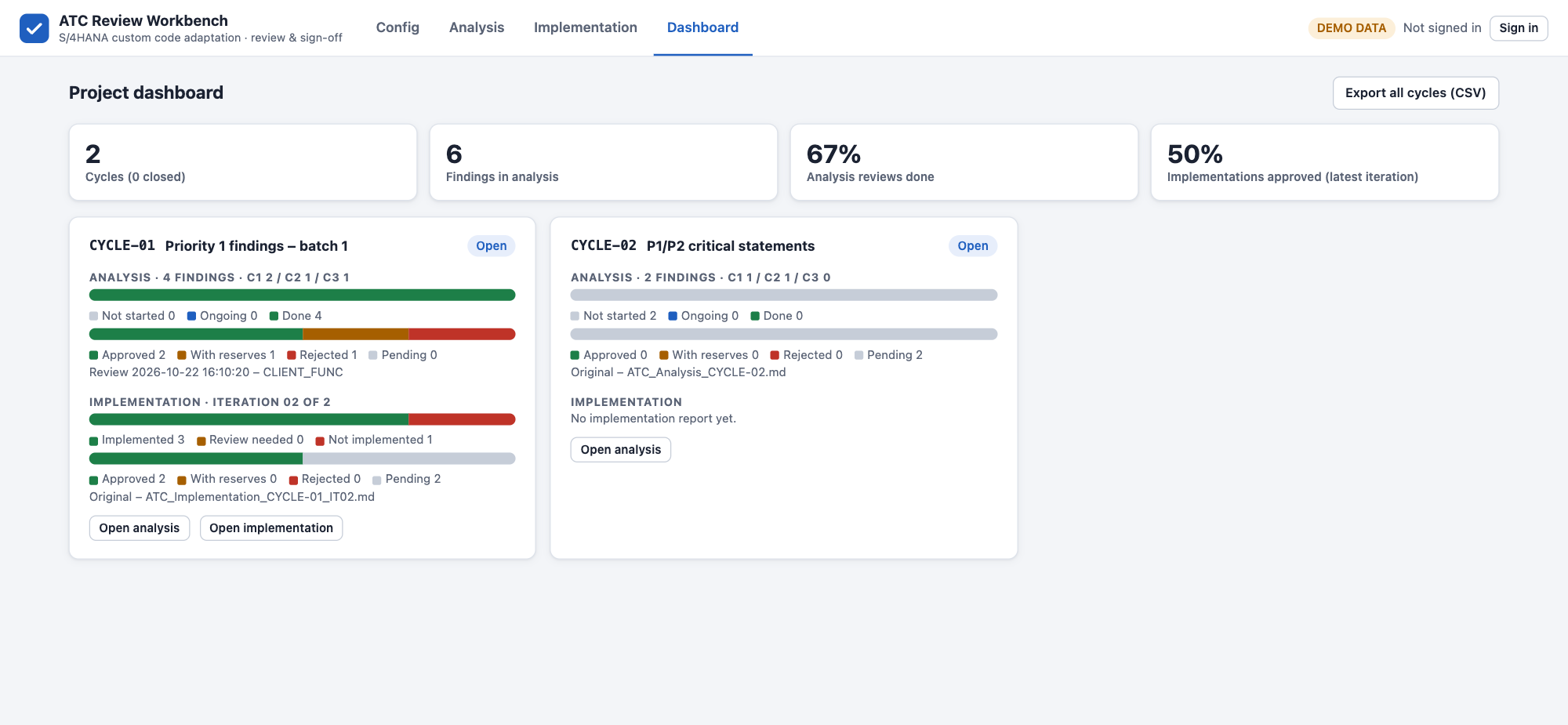
KPIs
| KPI | Meaning |
|---|---|
| Cycles | Number of cycles, and how many are closed |
| Findings in analysis | Findings in the analysis reports of all cycles |
| Analysis reviews done | Share of analysis findings with all required signatures |
| Implementations approved (latest iteration) | Share of findings approved in the latest implementation iteration of each cycle |
Cycle Cards
One card per cycle, with its ID, name and status (Planned, Open or Closed, from Config › Cycles).
| Part | Content |
|---|---|
| Analysis | Number of findings by complexity; bars for the review status (Not started, Ongoing, Done) and the decisions (Approved, With reserves, Rejected, Pending); the file the figures come from |
| Implementation | The latest iteration; bars for the implementation status (Implemented, Review needed, Not implemented) and the decisions; No implementation report yet before the first iteration |
| Open analysis / Open implementation | Jump to the cycle on the Analysis or Implementation page |
The figures use the latest review file of each report, or the original report when no review was saved yet.
Export
Export all cycles (CSV) exports every finding of every cycle with its module, tags, priority, complexity, findings, calls, decisions and signatures — ready for status reporting in Excel. The separator is set in Config › Other settings.